
Networking on mobile — area management and maps preview
The latest XF Track iOS and Android release brings networking area management and address maps preview to the field — features that were previously web-only.
We shipped a new version of XF Track for iOS and Android. If networking is enabled on your account, your crews can now manage areas and see address maps right from the app — the same workflows that used to live only in the web dashboard.
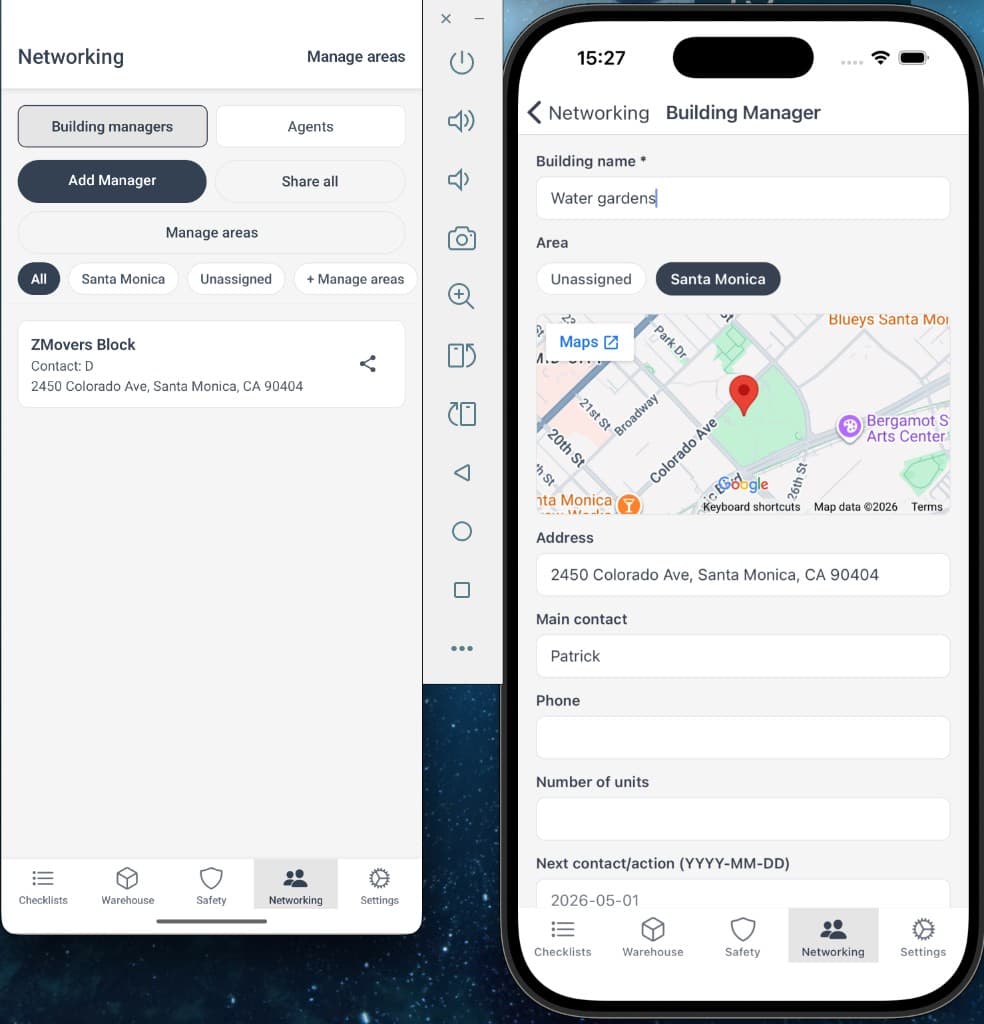
What's new
- Update areas for agents and building managers. Assign or change an area from a profile on your phone — no need to switch back to the browser.
- Maps preview on profiles. Open an agent or building manager and see the pinned address on a map before you head out.
- Manage areas from the list. On Android, filter by area and jump into area management from the networking screen.
Why this matters
Networking is a field job. Reps and managers are on the road, not at a desk. Until now, updating an area or confirming an address meant opening the web app — or asking someone in the office to do it.
With this release, area updates and location context stay in the same app your team already uses for checklists and QR workflows. Less context switching, fewer stale records, and faster follow-ups when someone is already looking at a contact on their phone.
Getting the update
Already installed? Update to the latest version from your device's app store. Sign in with your existing XFold account — no separate setup.
Networking must be enabled on your account for these features to appear. Don't see them after updating? Contact your administrator or reach out at xfold.tech/contact.