
Edit after completion — let crews update checklists from the warehouse
Turn on an optional edit window so field crews can finish a checklist on-site, then update it once they're back at the warehouse. Every change is emailed to the administrator, keeping readiness scores honest without slowing the job down.
Checklists used to be one-shot: submit, done, archived. That's fine for a pre-job walkaround, but it doesn't match how a post-job checklist actually gets filled out in the real world. Crews finish a job, tap through the checklist on a phone, and drive off. Any missing gear, damaged strap, or empty fuel tank gets remembered — if at all — back at the warehouse.
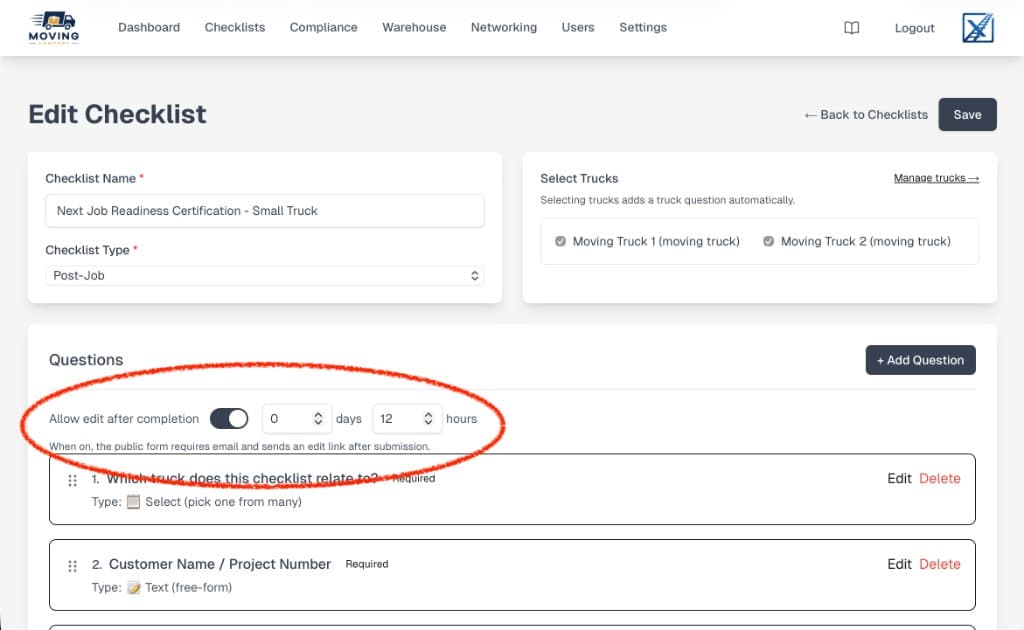
Edit after completion closes that gap. Flip the switch on any checklist, set how long the edit window should stay open, and let the crew reopen their own submission to fix, replenish, and confirm once they're back on site. The administrator gets an email the moment something changes.
How it works
- Flip the toggle on the checklist editor and pick a window — days, hours, or both. That window is the only time the edit link stays live.
- A mandatory email question is added automatically when the feature is on. Public forms now collect an email before they can be submitted.
- The crew submits as usual. The moment they tap Submit, they get an email with a secure, single-checklist edit link.
- They can reopen the submission from that link any time inside the window, change any answer, and save again.
- The administrator is notified on every update with a clean diff of what changed — old value, new value, who edited, when.
- The link expires automatically once the window closes. No cleanup, no stale access.
Why it matters
- Accurate data, not convenient data. Crews stop guessing at the end of a long day just to close out a job. They mark what they know on site, then correct the rest when they can actually see the truck.
- Readiness scores that reflect reality. Because updates flow back into the same submission, your post-job readiness metrics, warehouse replenishment lists, and compliance records all stay in sync — no duplicate entries, no "final" version floating in someone's inbox.
- A paper trail, for free. Every edit is timestamped and emailed to the admin. If a customer disputes something three weeks later, the history is already there.
- No new app to install. The edit link works from any browser. Movers don't need a login, a PIN, or a training session.
A real use case
A moving company runs a Next Job Readiness Certification checklist after every job. On site, the crew marks what they used, what's missing, and any damage. Back at the warehouse, they replenish the truck — blankets, straps, dollies, fuel — and update the same checklist to confirm the truck is ready for tomorrow.
The owner gets one email when the job closes, a second when the truck is actually road-ready, and the truck's readiness score flips to green without anyone re-keying data into a spreadsheet.
Turning it on
Open any checklist in the editor, toggle Allow edit after completion, and set the window. Save. That's it — the feature is live on the public form immediately, and existing submissions are unaffected.
Not using XFold Track yet? Start a free trial at xfold.tech and build your first post-job checklist in minutes.